Attention
Introduction#
Variance, or noise, is in inherent property of Monte Carlo Method which decreases as more particles are run. As such, there is always a trade off between variance and simulation time. Variance reduction techniques aim to shift this balance such that variance can be reduced without increasing simulation time. There are a number of ways you can think of doing this, for example:
Bias certain interactions so they occur more often
At a certain point, split certain particles N times, and reduce the weight of each particle by a factor of N
Make some rules about which particles you care about, and kill the others
Note that some of these techniques only change the variance of the simulation, whereas others (like killing particles) will also change the results of your simulation. That can be ok if the result are changed in a region you don’t care about, but obviously you have to be very careful. In general, the use of these techniques comes with a warning:
Warning
Variance reduction (VR) techniques in TOPAS can be combined to create a very sophisticated setup. However, please note that VR is highly dependent on your specific geometry. Approach these features with caution and test all variance reduced setups against an equivalent setup without variance reduction. You should also review the Geant4 document that describes which cases are problematic here.
To put this another way: *with great power comes great responsibility.*
All variance reduction techniques in TOPAS can be switched on/off with a master parameter:
b:Vr/UseVarianceReduction = "true"
Specific variance reduction techniques are described next.
Specify the Split Geometry#
The geometry for variance reduction must be in a parallel world. The type of component can be any standard solid (Dividable Components or Generic Components). The geometry must consist of a geometry component with a set of geometry sub-components as daughters. The sub-components must be located in such a way that the boundaries coincide. The split process or Russian roulette will occur at these boundaries. In the next figure a simple scheme is shown.
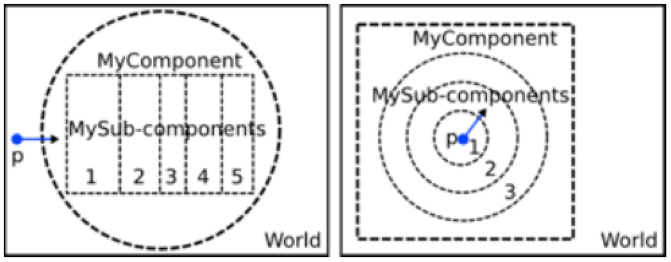
Time Features can be used to move or rotate the component or sub-components. But there is a restriction: the implementation of VR does not allow you to change the dimensions of the component and sub-components.
To set the geometry for VR:
s:Vr/ParticleSplit/Component = "MyComponent"
sv:Vr/ParticleSplit/SubComponents = n "MySubComp_1" ... "MySubComp_n"
Define the Splitting Technique#
There are three variance reduction techniques available:
To chose a technique, use for example:
s:Vr/ParticleSplit/Type = "GeometricalParticleSplit"